Showing posts with label run. Show all posts
Showing posts with label run. Show all posts
Monday, May 26, 2014
DataStage Scenario - Design8 - job1
DataStage Scenario Problem --> DataStage Scenario - Problem8
Solution Design :
a) Job Design :
Below is the design which can achieve the output as we needed. Here, we are reading 2 seq file as a input, then data is passing through a Join and Filter stage to achieve the output.
Sunday, May 18, 2014
DataStage Scenario - Design7- job1
DataStage Scenario Problem --> DataStage Scenario - Problem7
Solution Design :
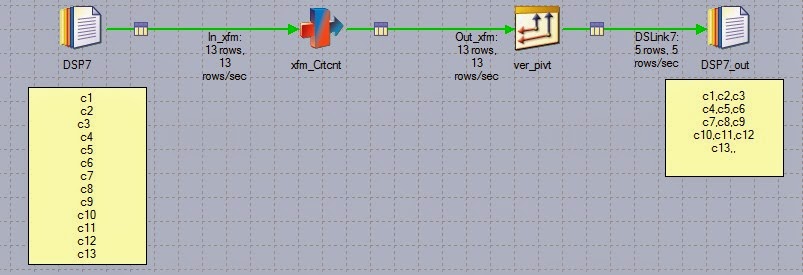
a) Job Design : Below is the design which can achieve the output as we needed. Here, we are reading seq file as a input, then data is passing through a Transformer and Peek stage to achieve the output.
Tuesday, October 15, 2013
How many places u can call Routines?
Routines can be called at the following places:
a) In the job properties There is an option to call the Before and After job subroutines.
b) In the job sequence there is an activity called "Routine Activity".From there also the routines could be called.
c) In the derivation part of theTransformer of a parallel job "parallel routines"can be called.
d) In the derivation part of theTransformer of a server job "server routines"can be called.
f)In the server job stages also before and after job subroutines can be called.
g)We have called routines from user variable activity of a sequence as well.(Here basically transforms are called which return a value to the variable of the user variable activity after their execution.)


Monday, September 30, 2013
Displaying/Change the attributes of a Queue Manager
Displaying the attributes of a Queue Manager
To display the attributes of a Queue Manager (say QMA),
use the DIS QMGR MQSC command:
$ runmqsc QMA
And you will see:
: dis qmgr
1 : dis qmgr
AMQ8408: Display Queue Manager details.
QMNAME(QMA) ACCTCONO(DISABLED)
ACCTINT(1800) ACCTMQI(OFF)
ACCTQ(OFF) ACTIVREC(MSG)
ALTDATE(2007-06-19) ALTTIME(20.34.04)
1 : dis qmgr
AMQ8408: Display Queue Manager details.
QMNAME(QMA) ACCTCONO(DISABLED)
ACCTINT(1800) ACCTMQI(OFF)
ACCTQ(OFF) ACTIVREC(MSG)
ALTDATE(2007-06-19) ALTTIME(20.34.04)
Tuesday, September 17, 2013
How can I run the osh command of the InfoSphere Parallel Engine?
The osh command is the main program of the
InfoSphere Parallel Engine. This command is used by DataStage to perform
several different tasks including parallel job execution and dataset
management. Normally, there is no need to run this command directly but
sometimes it is useful to use it for troubleshooting purposes.
To run this command there are 3 environment variables that must be set. These are:
- APT_ORCHHOME should point to Parallel Engine location
- APT_CONFIG_FILE should point to a configuration file
- LD_LIBRARY_PATH should include the path to the parallel engine libraries. Please note that the name of this environment variable may take a different name (such as LIBPATH in AIX or SLIB_PATH in HP-UX) depending on your Operating System. Note: This variable does not need to be set in Windows environments.
Friday, August 23, 2013
DataStage BASIC functions
These functions can be used in a job control routine, which is defined as part of a jobs properties and allows other jobs to be run and controlled from the first job. Some of the functions can also be used for getting status information on the current job; these are useful in active stage expressions and before- and after-stage subroutines.
Specify the job you want to control
DSAttachJob
Subscribe to:
Posts
(
Atom
)