Showing posts with label function. Show all posts
Showing posts with label function. Show all posts
Tuesday, June 16, 2015
trim leading 0's from decimal in DataStage
1. Convert the decimal (or whatever it was) to String.
2. then trim '0's from left.

Wednesday, February 04, 2015
Modify Stage - TRIM function
For trimming spaces or a char from a string can be done in modify stage. Below, I have shared the function syntax and some example, go Play ;-)
string_trim[character,direction,justify](string)
or
string_trim[character,direction](string)
or
string_trim[character](string)
or
string_trim(string)
Tuesday, February 03, 2015
Modify Stage - Handling NULLs
For handling the NULL value in columns we can use modify functions in DataStage instead of Transformer. Rather, I'll always prefer a transformer to avoid unnecessary effort which we put to setting up modify stage. But sometime to tune the job over performance we have to do that ;-)
The below Function Specification we have to use to Handle NULL --
The below Function Specification we have to use to Handle NULL --
Tuesday, July 29, 2014
Oracle SQL Tuning Tips - 1
Consideration
when writing an SQL statement is that it returns a correct result.
The second is that it be the most efficient for a given situation.
You can use many different SQL statements to achieve the same
result. It is often the case that only one statement will be the most
efficient choice in a given situation.
Remember
that processing SQL is a sequence of Parse (syntax check and object
resolution), Execution (required reads and writes), and Fetch (row
results retrieved, listed, sorted, and returned). SQL “tuning”
consists, quite simply, of reducing one or more of them.
Note:
generally Parse is the greatest time and resource hog. Parse overhead
can be minimized by the use of Procedures, Functions, Packages,
Views, etc.
Wednesday, May 28, 2014
Some Oracle SQL should known by Developer - 1
========================================================================
Monday, May 26, 2014
DataStage Scenario - Design8 - job1
DataStage Scenario Problem --> DataStage Scenario - Problem8
Solution Design :
a) Job Design :
Below is the design which can achieve the output as we needed. Here, we are reading 2 seq file as a input, then data is passing through a Join and Filter stage to achieve the output.
Sunday, May 18, 2014
DataStage Scenario - Design7- job1
DataStage Scenario Problem --> DataStage Scenario - Problem7
Solution Design :
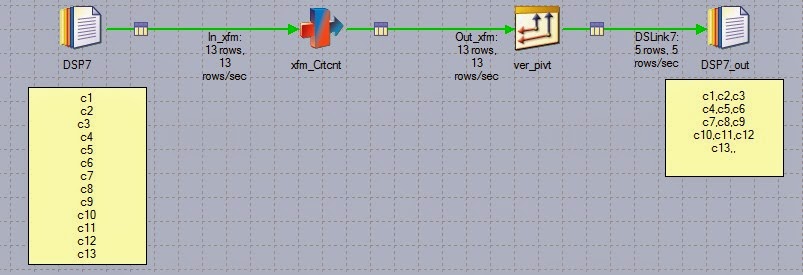
a) Job Design : Below is the design which can achieve the output as we needed. Here, we are reading seq file as a input, then data is passing through a Transformer and Peek stage to achieve the output.
Friday, May 16, 2014
DataStage Scenario - Design6 - job1
DataStage Scenario Problem --> DataStage Scenario - Problem6
Solution Design :
a) Job Design :
Below is the design which can achieve the output as we needed. Here, we are reading seq file as a input, then data is passing through a Transformer stage to achieve the output.

Wednesday, April 30, 2014
How to Create Custom Stages in Datastage Parallel Jobs ?
In addition to the wide range of parallel stage types available, the Designer allows you to define your own stage types, which you can then use in parallel jobs.
For creating custom stage in datastage which will functions as per our requirement and we will be able to modify that stage as we may want. Here is some information on custom stage functionality in datastage in parallel jobs and how can we create our own wrapped custom stage.
Friday, April 25, 2014
SQL Best Practices - Part1
Never put SQL scalar functions on columns in the WHERE predicates.
For example: WHERE YEAR(HIREDATE) = 2009 should be recoded as WHERE HIREDATE BETWEEN '2009-01-01'and '2009-12-31'.
When placing SQL scalar functions on columns in the SELECT portion of the SQL statement does incur some minimal overhead, but applying it to a column in the WHERE clause causes the predicate to become stage to non indexable.
Same applies for mathematics.
For example: WHERE HIREDATE – 7 DAYS > :HV-DATE should be recoded as WHERE HIREDATE > :HV_DATE + 7 days. Having the mathematics on the host variable is not a problem.
Wednesday, April 09, 2014
Some more design tips for DataStage Job Development
• Common information like home directory, system date, username, password should be initialized in a global variable and then variable should be referred everywhere.
• Stage Variables allow you to hold data from a previous record when the next record, allowing you to compare between previous and current records. Stage variables also allow you return multiple errors for a record of information. By being able to evaluate all data in a record and not just error on the first exception that is found, the cleanup of data is more efficient and requires less iteration.
Thursday, January 23, 2014
DataStage Scenario - Problem10
Goal : Get the max salary from data file ( Seq file )
We know that max function is use to get the max value in a column of a table, but here you have to design a datastage job which get the max value from seq file.
Input Seq File :
Thursday, December 12, 2013
Interview Questions : DataStage - self-3
100 If 1st and 8th record is duplicate then which will be skipped? Can you configure it?
101 How do you import and export datastage jobs? What is the file extension? (See each component while importing and exporting).
102 How do you rate yourself in DataStage?
103 Explain DataStage Architecture?
104 What is repository? What are the repository items?
105 What is difference between routine and transform?
106 When you write the routines?
Friday, August 23, 2013
DataStage BASIC functions
These functions can be used in a job control routine, which is defined as part of a jobs properties and allows other jobs to be run and controlled from the first job. Some of the functions can also be used for getting status information on the current job; these are useful in active stage expressions and before- and after-stage subroutines.
Specify the job you want to control
DSAttachJob
Thursday, August 22, 2013
How to split source column into multiple target columns ( full name to first and Last)
Approach:
CREATE SET TABLE test
(
fullname varchar(30)
);
INSERT INTO test12 ('nitin raj');
INSERT INTO test12 ('nitin agarwal');
INSERT INTO test12 ('abhishek gupta');
Subscribe to:
Posts
(
Atom
)